Create a partial backup
With innodb_file_per_table enabled, xtrabackup can take partial backups. Pick a selection method:
-
Match table names with a regular expression
-
List table names in a file
-
List databases (or tables) explicitly
Partial backup workflow
--copy-back is for a full prepared backup that can replace the whole datadir as one consistent tree. A partial backup omits tablespaces on purpose, while InnoDB’s data dictionary can still describe objects that are not present in the backup directory—so treating that tree like a full instance with --copy-back commonly produces missing-tablespace warnings, orphaned dictionary entries, or a server that needs hand repair.
Prefer restoring only the tables you backed up using the flows in Restore a partial backup and Restore single tables (typically create the table DDL, then DISCARD TABLESPACE / copy .ibd / IMPORT TABLESPACE). The partial-restore guide also documents a copy-back-to-empty-datadir variant with extra cleanup; use it only when you accept that operational cost. Do not start an incremental backup chain on top of a partial backup.
If a matched or listed table is dropped while the backup runs, xtrabackup fails: the backup must still copy that table’s files, and a concurrent DROP TABLE (or drop of its database) can remove the .ibd before the copy step. That is different from a new table created mid-run in a database already in scope, which may still be included. For heavy concurrent DDL, consider options such as --lock-ddl (see the FAQ).
This page assumes a test database with tables t1 and t2.
Narrow the backup scope with:
-
--tables— table names on the command line -
--tables-file— table names, one per line in a file -
--databases— databases or specific tables on the command line -
--databases-file— databases or specific tables, one per line in a file
Do not use --tables and --databases together
Combining them yields unreliable backups: restores may skip tables you needed or leave out data you thought you had captured.
They rely on different filters and clash when mixed:
--tablesuses regular expressions and implies a partial backup.--databasesuses exact names and implies a full backup of listed databases.
For example, a database named in --databases is fully backed up even if --tables was meant to limit it; expected tables can vanish from the archive. To mix full databases with hand-picked tables, pair --tables-file with --databases (see Filtering behavior with examples).
The --tables option
Pass --tables to xtrabackup with either:
-
A comma-separated list of fully qualified names:
database.table(for example,db1.t1,db1.t2,db2.t3) -
A POSIX regular expression in single quotes that matches the full
databasename.tablenamestring
Back up every table in test:
xtrabackup --backup --datadir=/var/lib/mysql --target-dir=/data/backups/ \
--tables='^test[.].*'
Back up only test.t1:
xtrabackup --backup --datadir=/var/lib/mysql --target-dir=/data/backups/ \
--tables='^test[.]t1'
The --tables-file option
--tables-file points to a file with one database.table per line. XtraBackup includes only those tables, matching names exactly (case-sensitive), with no patterns or regex. Use fully qualified names.
echo "mydatabase.mytable" > /tmp/tables.txt
xtrabackup --backup --tables-file=/tmp/tables.txt
The --databases and --databases-file options
Both options pick databases or tables to include and share the same filter rules; only the input format differs:
--databases |
--databases-file |
|
|---|---|---|
| Where | Comma-separated on the command line | Path to a file, one database or database.table per line |
| Format | mysql,mydb,mydb.t1,mydb.t2 |
Same databasename or databasename.tablename format, one per line |
| Use when | Short, one-off runs | Long lists or scripted reuse |
--databases takes a comma-separated list. Append .* after a database name to grab every table in it (for example, mydb.*). Regex elsewhere is not supported.
Include mysql, sys, and performance_schema whenever you list databases with --databases or --databases-file, even if you only care about application data. A partial backup that is meant to become a runnable datadir (after prepare and especially after --copy-back) must still contain the system catalogs MySQL Server expects on disk.
mysql— Accounts, privileges, and MySQL 8.0 system tables (including metadata InnoDB uses). If this schema is missing from the backup,mysqldusually fails to start after you copy the tree into place, or the instance comes up without a working login or privilege layer.performance_schema— Default instrumentation tables and structures; omitting it commonly causes startup errors or a failed upgrade/bootstrap of internal state.sys— Helper views built onperformance_schema; omitting it breaks tools and scripts that assume it exists.
The failure shows up at restore time—typically the first server start after --copy-back (or an equivalent full-datadir deployment), not during xtrabackup --backup. xtrabackup --prepare may still run, but you discover the gap when the server refuses to start or is unusable.
If you never replace a whole datadir—only import selected tables into an existing server that already has its own mysql / sys / performance_schema—you might not need those schemas in this partial backup; the flows above assume you may rely on a full-datadir restore path.
Note
Backups take time. If someone creates a table while the run is in progress, XtraBackup may still copy it even though you never listed it, provided (1) its database already sits inside your filter and (2) the table exists when that database is processed.
xtrabackup --backup --databases='mysql,sys,performance_schema,test' --target-dir=/data/backups/
Filtering behavior with examples
Never mix --tables and --databases in one invocation. XtraBackup applies --databases first; that pass can override your --tables regex, so you may omit critical tables or pull in extras—both invite data loss on restore.
How filtering works
To see why those flags clash, follow the evaluation order: database filter first, then table filter.
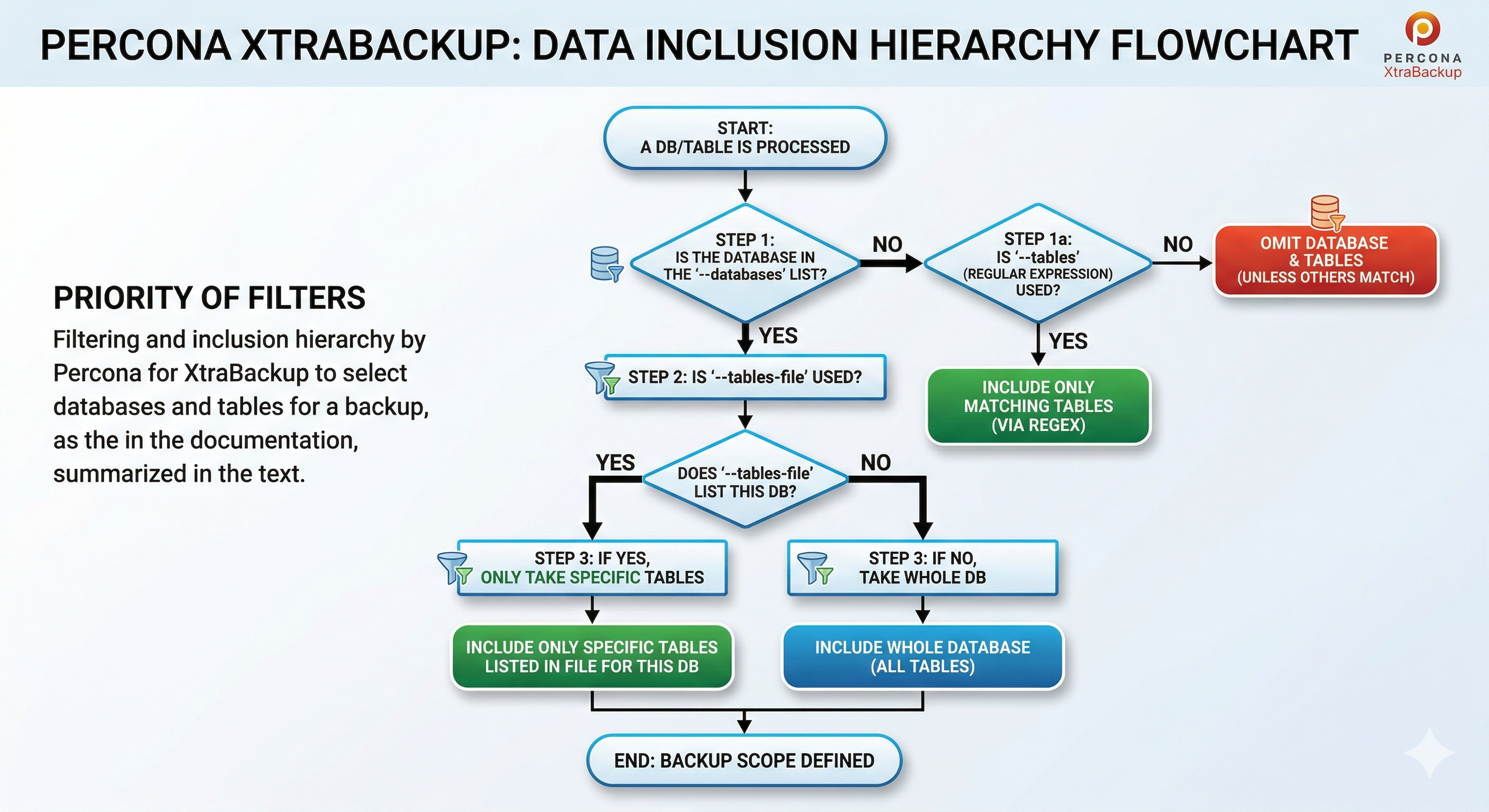
Database check (--databases)
XtraBackup decides inclusion or exclusion at the database level.
- With
--databases, any database absent from the list is skipped outright. - A database on the list normally brings in every table—unless you also pass
--tables-file. Then, for databases named in both places, only the tables listed in the file are copied.
Example pairing --tables-file with full system databases: to capture all of mysql, performance_schema, and sys, plus only testdb.table1 and testdb.table2, put the two table lines in a file. List the three system databases in --databases; omit testdb there.
echo -e "testdb.table1\ntestdb.table2" > tables.txt
xtrabackup --backup --databases="mysql,performance_schema,sys" --tables-file=tables.txt --target-dir=/data/backups/
The database stage pulls in mysql, performance_schema, and sys. The table stage adds testdb.table1 and testdb.table2. Outcome: full dumps of the three system databases; from testdb, only those two tables.
Table check (--tables / --tables-file)
For each database that cleared the first stage, XtraBackup chooses tables via --tables or --tables-file:
-
--tables: Supply a comma-separateddatabase.tablelist or one POSIX regex. Only names that match are copied. -
--tables-file: Supply a path to a file with one exactdatabase.tableper line (no regex). Any database named in this file is limited to those tables—even if--databasesalso lists that database.
With both --databases and --tables-file: listed databases are eligible, but for any database also named in the file, only the tables in the file are copied. With --databases alone: every table in each listed database is copied.
Solution: combine specific tables and whole databases
To back up hand-picked tables in one schema (say testdb.table1, testdb.table2) while taking full dumps of others (mysql, performance_schema, sys), use one of the methods below—never --tables plus --databases for that job:
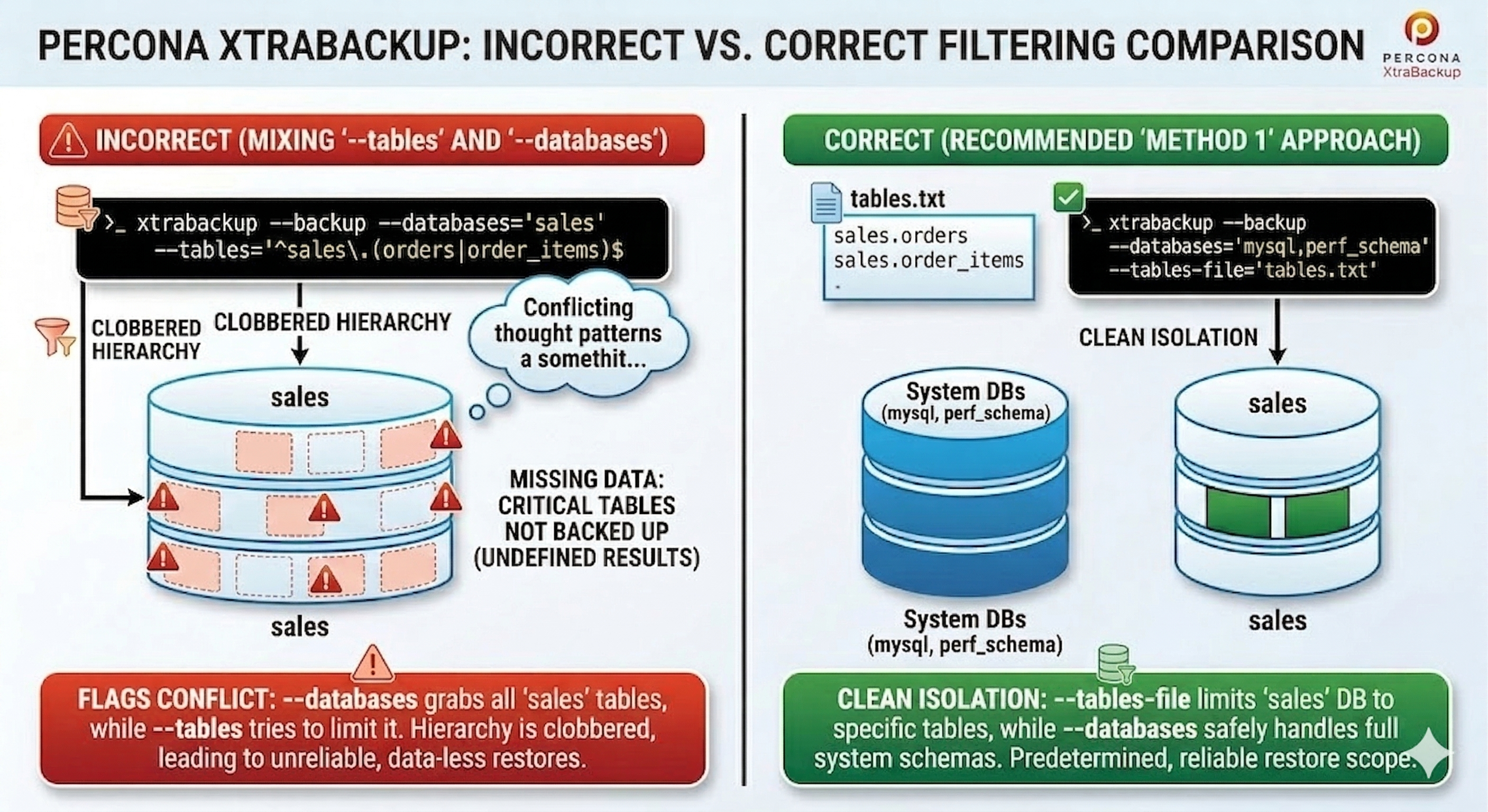
- Case 1:
xtrabackup --backup --tables="testdb.table1" --databases="mysql"—testdbnever enters the database filter, so nothing fromtestdbarrives. - Case 2:
xtrabackup --backup --tables="testdb.table1" --databases="mysql,testdb"—testdbis fully included; XtraBackup copies every table there and ignores the--tablesregex.
Preferred approaches:
Method 1: --tables-file (recommended)
List the exact tables, one per line:
testdb.table1
testdb.table2
Run XtraBackup with --tables-file and --databases. Omit the database that owns the partial list from --databases; the file carries that scope. Name only the databases you want in full (typically the system schemas):
xtrabackup --backup --tables-file=tables.txt --databases="mysql,performance_schema,sys" --target-dir=/data/backups/
Here --tables-file limits testdb to the listed tables while --databases covers the system databases completely.
Avoid duplication
When --tables-file names tables from a database (for example, testdb), do not repeat testdb in --databases. Doing so flips the job to a full database backup.
Method 2: --databases for everything
List specific tables in --databases using database.table. That copies the system schemas in full and only the listed tables from testdb:
xtrabackup --backup --databases="mysql,performance_schema,sys,testdb.table1,testdb.table2" --target-dir=/data/backups/
For an entire single database, suffix the name with .* (for example, mydb.*). See the databases option reference.
Example: mixing flags with a sales schema
Suppose a sales database holds orders and order_items and you want only those two tables, plus a full copy of mysql. Mixing --tables and --databases might look like this:
xtrabackup --backup --databases='mysql,sales' --tables='^sales\.(orders|order_items)$' --target-dir=/data/backups/
Do not rely on that command: you are not guaranteed only sales.orders and sales.order_items. The backup might hold just those two tables, or it might include every table in sales plus all of mysql, or something inconsistent in between.
Preferred: list only mysql under --databases and name the two tables in --tables-file:
echo -e "sales.orders\nsales.order_items" > sales_tables.txt
xtrabackup --backup --databases='mysql' --tables-file=sales_tables.txt --target-dir=/data/backups/
Or pass the tables on the --databases line (no --tables):
xtrabackup --backup --databases='mysql,sales.orders,sales.order_items' --target-dir=/data/backups/
The --databases-file option
--databases-file points to a file of databases and tables in databasename[.tablename] form, one entry per line. Names match exactly (case-sensitive); patterns and regex are not applied.
Note
Backups take time. If a table appears mid-run, XtraBackup may still copy it though you never listed it, when (1) its database already lies inside your filter and (2) the table exists when that database is processed.
After the backup
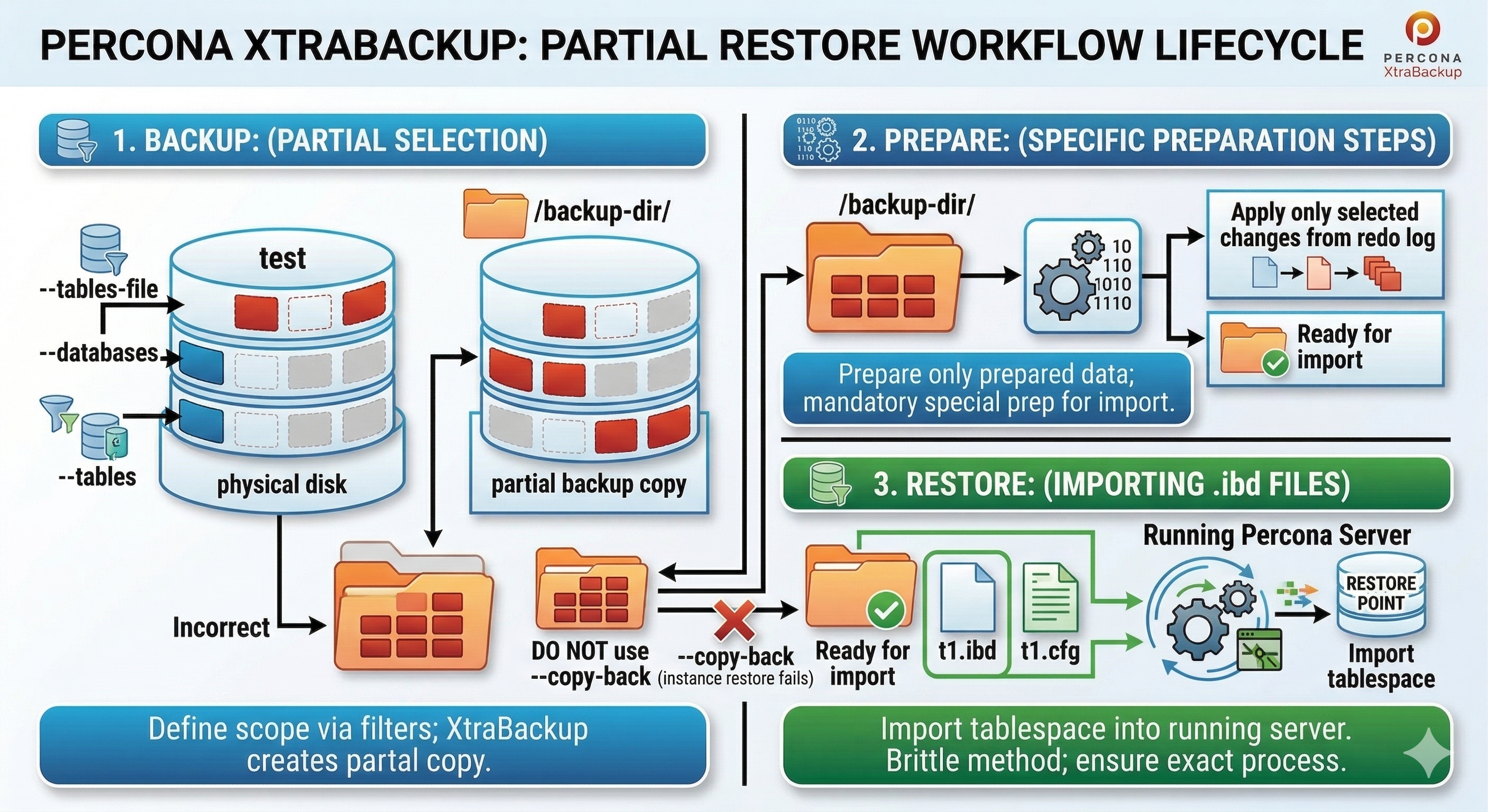
Next, prepare the backup before you restore.